See Scope Architect on your own project. Get a walkthrough →

A vague idea in.
An agent-ready plan out.

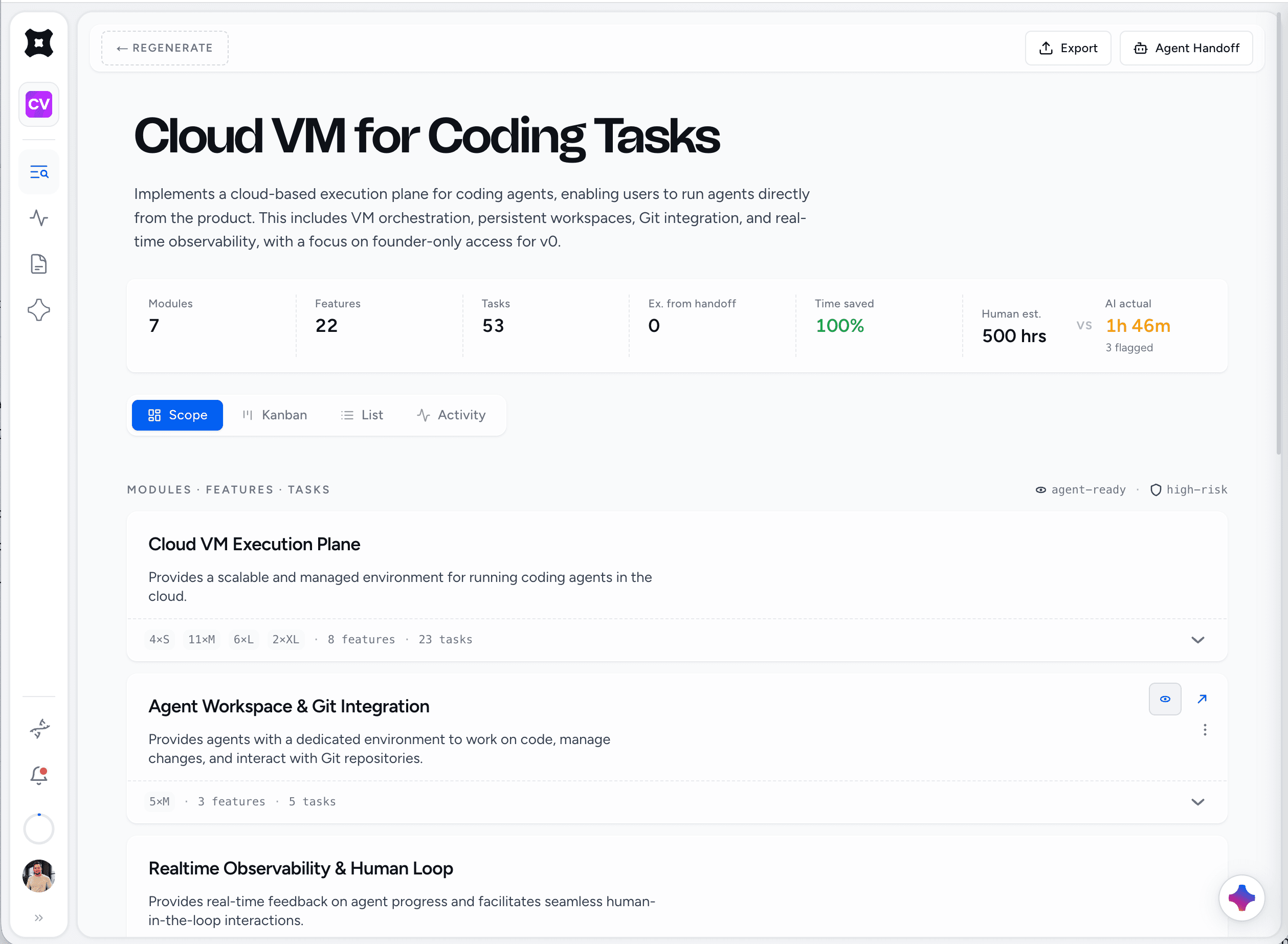
Drop in an idea, a ticket, or a repo. The Scope Engine decomposes it into modules, features, and atomic tasks with acceptance criteria, each sized for a single agent session and calibrated to your stack.

IdeaTicketRepoNotes
scope engine
ModulesFeaturesTasks
Acceptance criteriaDependenciesEffort

From a raw idea to an agent-ready plan.

Dump your idea, ground it in your real code, let the engine assemble the modules, and finalize the pre-scope, all before a single task is generated.

Dump your idea

Clear on what to build? Dump your messy notes or a full project brief. Not clear? Shape it through guided discovery with Architect Chat.

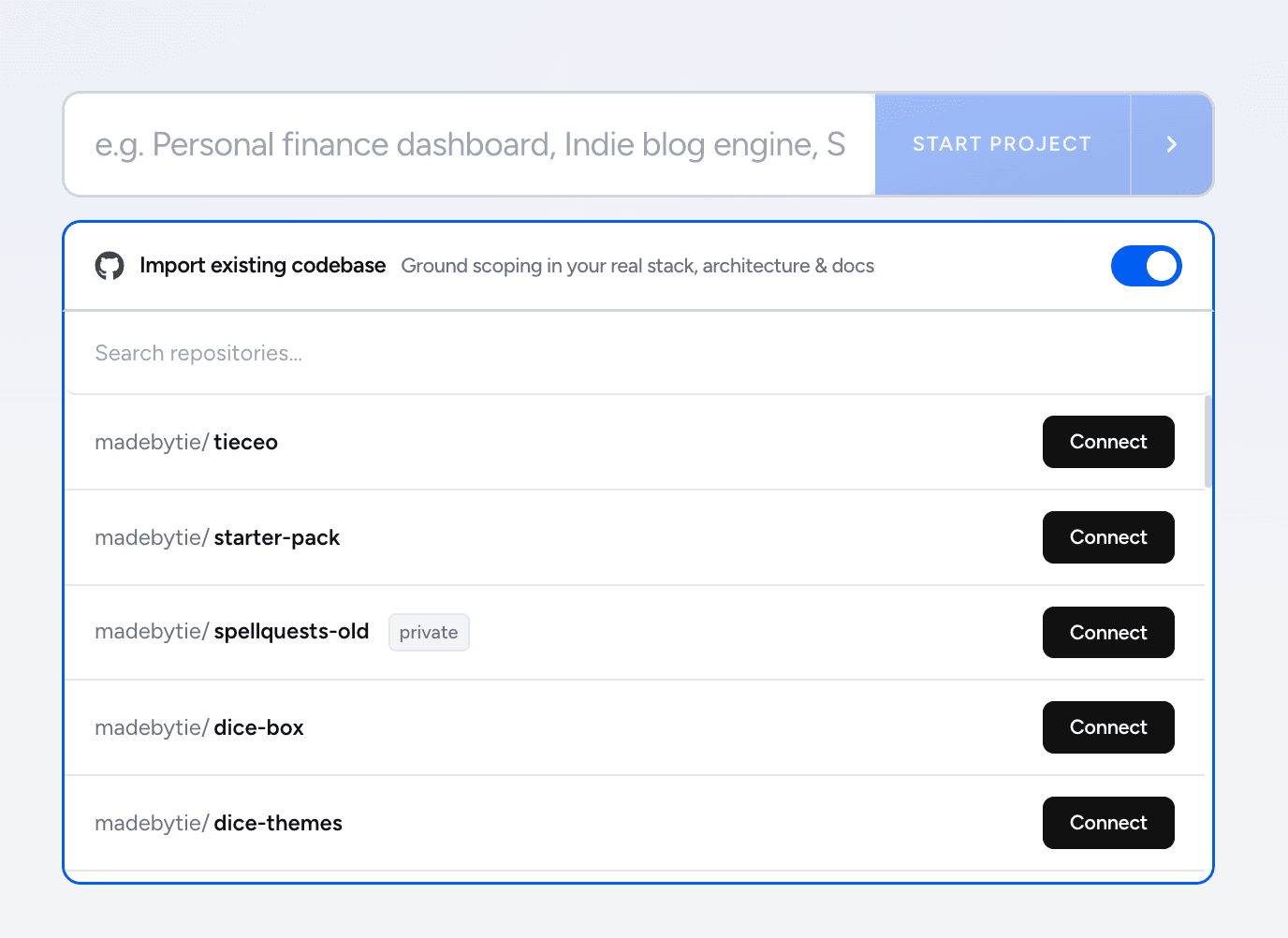
Import an existing project

Connect a Git repo so your scope is grounded in your real stack, not a blank slate.

AI builds your modules

The engine reviews your idea, then auto-selects and assembles the modules it should contain.

Configure and finalize your pre-scope

Review the pre-scope, adjust modules and settings, and lock it in before a single task is generated.

Configuring and finalizing the pre-scope

Architect your scope in seconds.

Stop spending hours writing scope documents from scratch. Paste your notes, pick your modules, and let the architect build the blueprint.

01.Drop in your idea

Paste raw notes, a Linear ticket, a Slack thread, or just a one-liner. The engine handles parsing, context extraction, and initial requirement mapping — no rigid templates required.

SaaS & App Development Grid
Paste Discovery Notes

02.Pick your modules

Pre-configured starting points (auth, billing, dashboards, APIs) ground the engine in reality. Your Builder Profile (stack, target agent, code style) shapes every spec it produces.

Auth
Payments
Dashboard
API
CMS
Emails

03.Recursive decomposition

Multi-pass recursive expansion maps vague requirements into modules, features, and atomic, agent-sized tasks with acceptance criteria and dependency graphs.

Parsing your idea

04.Refine in Architect Chat

Edit modules and tasks inline, or talk to the architect — "break this finer," "add edge cases," "mark agent-ready." Every change is a diffable plan you preview and apply in one click.

Edit & Calibrate View
Calibration Detail

A complete scope, ready to build.

Modules, features, and atomic tasks, generated, refined, and shaped together with your team.

Modules, features, and tasks

Your AI product partner, in every build.

Talk through scope against time and risk. Float an idea before you commit and it maps the real surface area. Ask what to cut and it reasons over the whole plan, not just the task in front of you. Every change comes back as a structured plan you preview and apply. No drift, no half-applied edits.

What you can ask for
  • Decide what's in the MVP
  • Pressure-test a new feature
  • Reprioritize when scope creeps
  • Split work into agent-ready tasks
  • Approval-gated scope edits
  • Queue tasks and launch runs from chat
Break the auth feature into smaller agent-ready tasks with acceptance criteria.
Done. Split into 6 atomic tasks: signup, login, password reset, OAuth, session refresh, audit log. Each has acceptance criteria and explicit dependencies.
Queue everything that's agent-ready in payments and start the first run. Stop at $10.
Run plan ready: 5 tasks queued in dependency order, budget $10, starting with Stripe setup. Claude Code builds it in a fresh cloud VM and opens a PR. Approve to launch.
15-60sFrom idea to a full scope
Unlimited projects, modules, and tasks
3Scope modes: project, module, feature

Your defaults, built into every scope.

Next.js or Remix, Postgres or Mongo, tRPC or REST: pin your defaults once and every scope lands in a context your agent already understands. Name your target agent and the engine tunes acceptance criteria and task granularity to match. Hours, story points, or agent sessions: the math stays consistent, the labels match how you plan.

Calibration
  • Tech stack
  • Target agent
  • Estimate unit
  • Code style notes
  • Testing preferences
  • Acceptance-criteria style
Configuring the Builder Profile: stack, target agent, estimate unit, and conventions

Everything behind your build, in one place.

Builder Profile

Your stack, target agent, code style, and estimate unit. The engine scopes to your defaults on every project.

Connect GitHub

Link repos to projects so scopes are grounded in your real code and agents can open PRs against it.

Preset Library

Reusable module and feature presets that drop straight into a scope, so common builds start most of the way done.

Export anywhere

Export any scope to clean JSON or Markdown, ready to hand to any tool or agent.

Context Dashboard

Always-injected context blocks your AI reads on every generation and build, so nothing gets lost.

Memory Management

Durable facts your agents record and reuse, so the project keeps its memory between sessions.

Markdown Docs

Markdown docs that live with the project. Pin the ones your agent should always read.

BYOK

Bring your own keys for Anthropic, OpenAI, Google, xAI, or DeepSeek. Pay providers directly, with no markup.

Team Management

Invite your team, manage seats and roles, and work the same plan together in real time.

Connect CLI, run in the cloud

Connect Claude Code or Grok to run tasks in the cloud and get a pull request back — more agents coming.

Token Analytics

Per-operation token usage and cost across every project, in one usage dashboard.

Take command of your next build.

Your agents do the building. You stay in control of every move.

Bring your API keys.

Run on platform credits out of the box, or bring your own API keys for Anthropic, OpenAI, Google, and more to go unlimited.

API Provider Management
Encrypted at rest
Gemini
... rW7s Remove
OpenAI
+ Add API Key
Anthropic
**** Remove
xAI
+ Add API Key
Choose Default Model
GPT-5.6
Ultra-fast generation.
Claude Sonnet 5PRO
Architectural drafting.
Claude Opus 5PRO
Creative & nuanced.

Scope it once.
Build from it everywhere.